




Originally published on smbd security on 3 September 2026. Reposted with permission.
Turning UNC-based Net-NTLMv2 leakage into an improved phishing technique practical enough to use during a real engagement.
Recently, I was involved in a red team engagement where I had already achieved the main objective of gaining initial access through several different routes. Rather than going down the same paths again, I wanted to use the opportunity to test an idea that had been sitting in the back of my mind for a while: could I turn UNC-based Net-NTLMv2 leakage into a phishing technique that is practical enough to actually use during an engagement?
UNC-based attacks are obviously nothing new. The problem was making the technique compelling enough to use during an actual engagement. If you think about something like ClickFix, abusing a UNC path just to obtain a Net-NTLMv2 challenge-response feels somewhat unnecessary. If I can convince a victim to perform those actions, there are usually more impactful things I could ask them to execute instead of obtaining authentication material that I still need to crack.
The same applies to vishing. Why bother convincing someone to access a UNC path just to capture Net-NTLMv2 when I could guide them towards something that provides a more direct path to account takeover, such as device code phishing or self-service password reset.
My general rule for phishing is simple: if I wouldn’t fall for it, I don’t want to use it. That was the problem my idea was aimed at solving.
Where the Idea Started
Ever since completing Pwned Labs’ Phished for Initial Access lab, I had wanted to experiment further with this technique. The lab demonstrates capturing Net-NTLMv2 authentication by convincing a victim to access a UNC path while a rogue SMB endpoint is hosted on an EC2 instance. When Windows attempts to authenticate to the remote SMB service, the authentication exchange can be captured using tools such as Responder or Pretender.
It works, but directly asking somebody to paste a UNC path into Windows + R, or navigate to one manually, is not necessarily the most convincing phishing scenario. I mean, imagine sending a suspicious link, you copy pasting it, and clicking enter… It’s too many steps to follow. I wanted something more practical, but the browser was initially the biggest obstacle.
When I tried redirecting directly to a UNC path, the browser would interrupt or modify the request. I also experimented with iframes and similar approaches, but modern browser security controls consistently prevented the behaviour I wanted.

While researching this problem, I eventually found Andrew Schwartz’s excellent research, When “Moderate” Means “Sometimes”, which gave me the missing piece I had been looking for.
The Search URI Handlers
Windows exposes the search: and search-ms: URI handlers. Importantly, these handlers can accept a file path pointing to a UNC location. If the supplied path references a remote SMB endpoint, Windows may attempt to access that resource, potentially triggering authentication while reaching the remote path.
If the UNC path points towards attacker-controlled infrastructure, the resulting Net-NTLMv2 authentication exchange can potentially be captured. Instead of trying to convince the browser itself to navigate directly to a UNC path, I could use the Windows URI handler as the bridge between the browser and SMB.
This is what Andrew brought to my attention.
Setup
The infrastructure for the engagement was relatively straightforward. I deployed Responder on an EC2 instance so that the required SMB service was reachable from the target environment.

Keeping Bots Away from the Lure
I did not want automated scanners immediately crawling the lure and discovering the UNC destination. Apart from potentially causing the site to be classified as malicious, automated analysis from email security products could expose the underlying behaviour before an actual user reached the page.
For this engagement, I placed Cloudflare Turnstile in front of the relevant functionality, although other CAPTCHA or human-verification solutions could serve a similar purpose. For ease of deployment, I hosted the infrastructure using Cloudflare Workers and implemented the lure logic there.
I also added a Teams webhook to give me visibility into traffic reaching the lure. Notifications were generated for new visitors and whether the Cloudflare verification was passed or failed, along with information such as the source IP address, country, user agent, timestamp, requested path and referrer.
This telemetry helped me distinguish likely user interaction from automated scanners and security products. For example, I could look up the source IP address and ASN to determine whether traffic appeared to originate from the target organisation, then correlate that with the user agent, referrer and verification result to understand what was interacting with the lure.
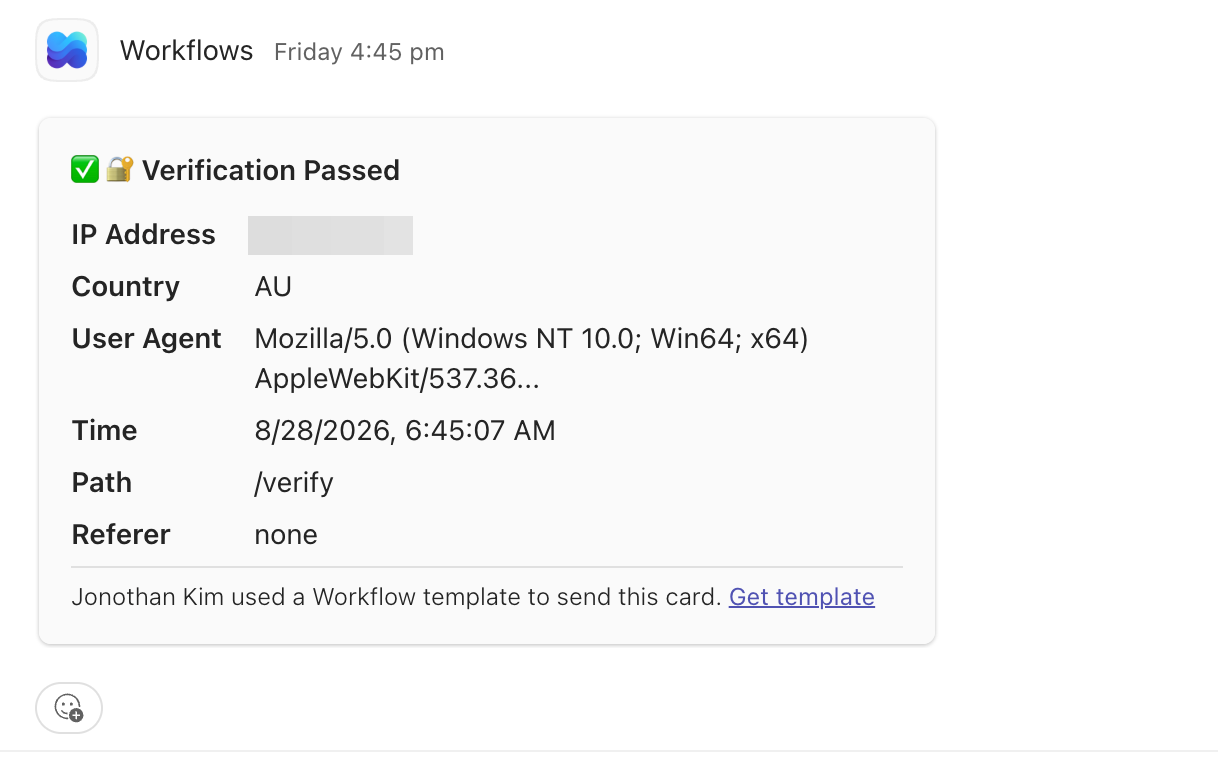
The webhook did not directly tell me why an SMB authentication attempt had failed to arrive, but it provided useful context. If a likely user from the target organisation passed verification but Responder never received Net-NTLMv2 authentication, I knew the interaction had progressed beyond the initial verification stage. From there, the remaining possibilities included the user not accepting the subsequent prompt, a security product interrupting the flow, or endpoint and network controls preventing the SMB or NTLM authentication.
That visibility was particularly useful when testing against controls such as Netskope and made troubleshooting the campaign significantly easier than relying on Responder output alone.
Making the Interaction Believable
There was also an important usability problem. When the victim activates the URI handler, the browser displays a confirmation prompt asking whether the external application should be opened. The phishing scenario therefore needed enough context for clicking Open to feel like the natural next step rather than something suspicious.
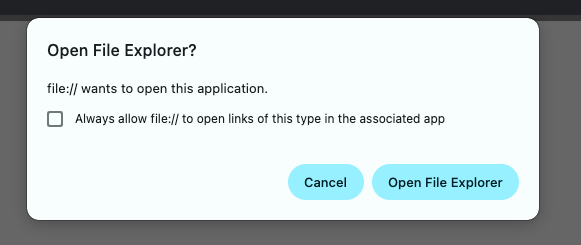
Since I was already using Cloudflare Turnstile to keep automated scanners away from the lure, I decided to use the verification process itself as the pretext for the next interaction. Rather than introducing an unrelated reason for Windows to suddenly display an Open prompt, I built the lure around the verification flow that the user was already interacting with.
After the initial verification stage, the page introduced an apparent verification problem and prompted the user to complete an additional step before continuing. This created a natural linking point between the Cloudflare-style verification workflow and the Windows external application prompt, making the request feel like part of the same process.
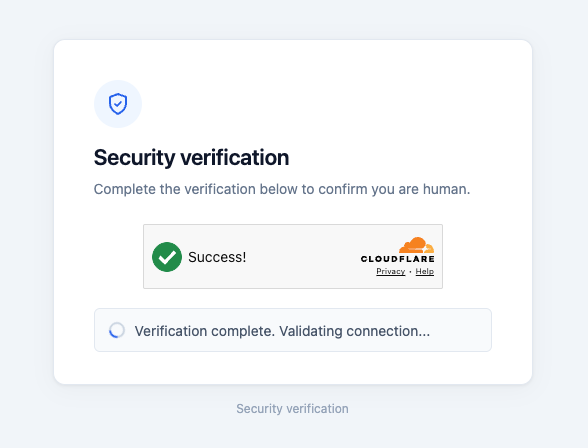
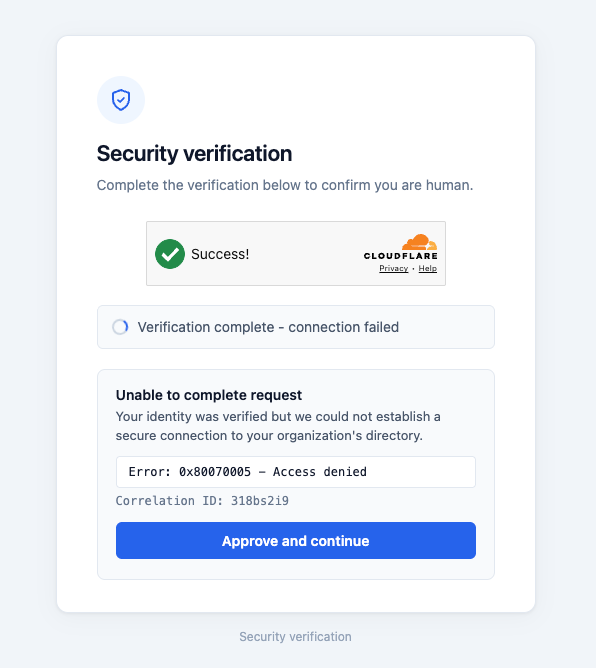
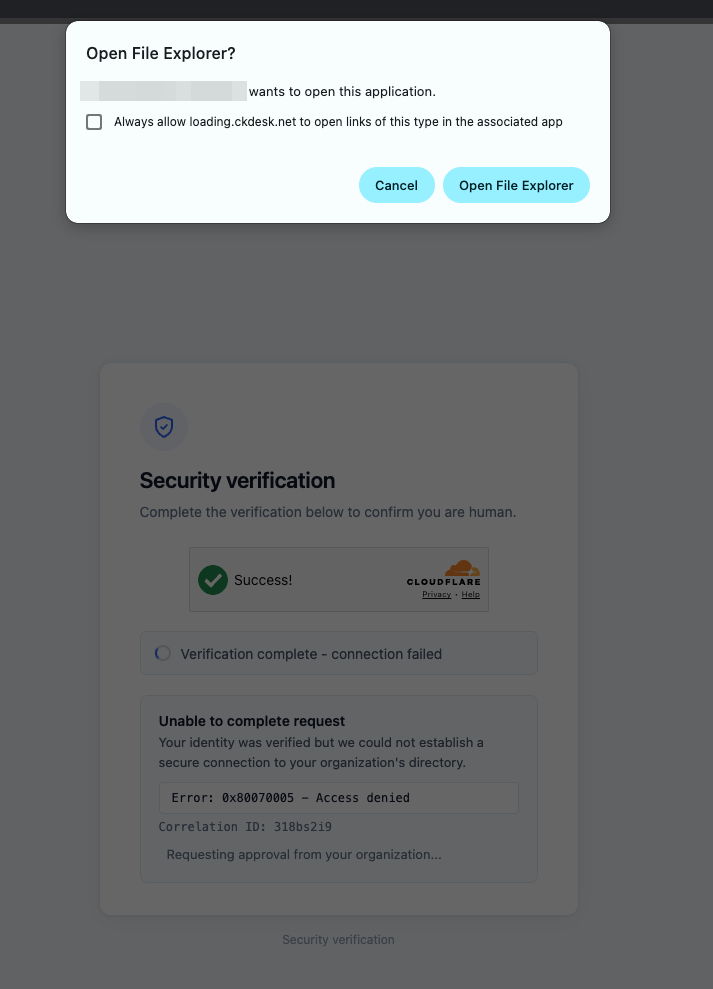
By the time the Windows prompt appeared, the user was already expecting to approve an additional verification step. Clicking Open therefore became the next action in an existing workflow rather than an unexplained request appearing out of nowhere.

With all the pieces in place, the complete interaction looked like this:
Once the interaction completed, I redirected the user to a legitimate and trusted website so the overall experience did not simply terminate on an unexplained page.
The lure itself can be adapted to different scenarios. The important part is not necessarily the Cloudflare branding or hosting platform, but creating believable context for why Windows suddenly asks the user to open something.
During my engagement the lure worked and resulted in capturing a Net-NTLMv2 challenge-response from a domain user. The user’s password was relatively weak, so I was able to crack the captured response in under an hour, giving me another route to initial access.
I have uploaded the lure code to my GitHub. If anybody wants an easy PoC to experiment with, feel free to use it.
The Root Cause
It would be easy to describe the root cause of this attack as “the employee clicked the Open button”, but I don’t think that is entirely accurate. The condition that made the attack possible existed before the user interacted with the lure: the endpoint was permitted to establish outbound SMB connectivity to an internet-hosted system and send NTLM authentication to it.
One thing I consistently emphasise during red team engagements is that an employee falling for phishing or vishing should not automatically become the root cause of a finding. Social-engineering techniques continuously evolve, and attackers become better at creating convincing context, reproducing legitimate workflows and exploiting behaviours users encounter during normal work.
Where possible, centrally managed security controls and endpoint configuration should therefore be relied upon in order to make the user the final security boundary.
For this attack specifically, there were two opportunities to break the chain. The first was preventative: outbound SMB connectivity and/or outgoing NTLM authentication could have been restricted so that the endpoint was unable to send the authentication exchange to my internet-hosted SMB service.
The second was detective. An endpoint initiating SMB authentication to an address across the internet, particularly to a destination that was previously unseen or anomalous for that device or user.
Ideally, both controls should exist. Prevent unnecessary outbound SMB and NTLM authentication wherever possible, and monitor the remaining activity for connections to internet-hosted or otherwise anomalous destinations.
Employee awareness is obviously still important, but defensive architecture should assume that eventually John from marketing will click the link. A single convincing interaction should not be enough for a Windows endpoint to send reusable authentication material to an arbitrary system on the internet.
Then I Tried It Against Entra ID
This is where things became more interesting. I tested the lure against Microsoft Entra joined devices where users were signed in with Entra ID accounts rather than traditional Active Directory domain accounts.

Under the conditions I tested, the result was the same. I captured a Net-NTLMv2 authentication exchange, with the captured identity represented using the user’s Entra-associated sign-in name.
This surprised me at first. A cloud-only Entra ID environment has little reason to rely on NTLM for normal cloud authentication, yet accessing the SMB resource still caused Windows to attempt NTLM authentication using locally available credential material.
I cracked the captured response and confirmed that it corresponded to the password used by the Entra user. This does not mean Entra ID itself is sending an NTLM hash, nor is the user’s password or NT hash being transmitted directly over the network. Rather, Windows was able to perform an NTLM challenge-response using credential material available to the local Windows authentication stack.
At the time, I was assessing several Entra ID environments, which gave me an opportunity to see whether this was isolated to a single configuration. I reproduced the same behaviour across multiple test environments where Entra joined endpoints were able to reach my controlled SMB service and attempt Net-NTLMv2 authentication over the internet.
That does not mean the behaviour should be assumed to occur identically across every Entra joined endpoint. The authentication path and credential material available to Windows can vary depending on how the user signs into the device. Mechanisms such as Windows Hello for Business use key-based authentication and can therefore result in different authentication behaviour.
The Windows edition also mattered during my testing. I reproduced the behaviour on Windows Pro and Windows Server, while the Windows Home environment I tested did not behave the same way. These results should therefore be treated as representative of the configurations I tested rather than something that will necessarily occur across every Windows or Entra joined endpoint.
One environment provided an especially useful comparison. The client had configured Windows to deny outgoing NTLM authentication. The endpoint could still establish connectivity to the SMB service, but the Net-NTLMv2 authentication exchange never occurred.
This raised a broader question: how many organisations actually restrict outbound SMB and NTLM authentication from their Entra joined endpoints?
Restricting SMB across network boundaries is well understood in traditional Active Directory environments. In cloud-first environments, however, it can be easy to assume that removing on-premises Active Directory also removes the risks associated with legacy Windows authentication. My testing showed that this assumption does not always hold.
More importantly, the environment that blocked outgoing NTLM demonstrated that moving to Entra ID was not itself the security boundary. The endpoint controls still mattered.
Mitigation
There are two practical ways to prevent this attack path: restrict unnecessary outbound SMB connectivity and prevent Windows from sending NTLM authentication to remote systems.
Where endpoints have no legitimate reason to communicate with external SMB services, outbound TCP/445 should be blocked through Windows Defender Firewall and, where appropriate, perimeter network controls. This prevents the endpoint from reaching an attacker-controlled SMB service in the first place.
A blanket restriction may not be suitable for environments that rely on legitimate SMB connectivity, including services such as Azure Files, so existing dependencies should be understood before enforcement.
Where SMB connectivity is still required, a more targeted control is the policy setting Network security: Restrict NTLM: Outgoing NTLM traffic to remote servers, which controls whether Windows is permitted to use NTLM when authenticating identities to remote servers. This can prevent the authentication exchange even where the underlying SMB service remains reachable.
Microsoft documents the outgoing NTLM policy using the following states:
| Value | Effective policy state | Behaviour |
|---|---|---|
0 | Allow all | Outbound NTLM authentication is permitted. |
1 | Audit all | Outbound NTLM remains permitted, but authentication requests are audited. |
2 | Deny all | Outbound NTLM authentication is blocked. |
Microsoft recommends initially configuring the policy as Audit all and reviewing Applications and Services Logs\Microsoft\Windows\NTLM\Operational to identify legitimate services that continue to rely on outbound NTLM. Dependencies can then be remediated or appropriate remote-server exceptions configured before progressing to Deny all, as denying outbound NTLM may affect clients, services and applications that continue to depend on it.
Detection should complement these preventative controls. Unexpected outbound SMB or NTLM authentication to internet-hosted systems, particularly destinations that are new or anomalous for the endpoint or organisation, should be monitored and investigated.
These controls also protect against more than this particular lure. UNC paths, shortcut files, URL files and other forced-authentication techniques can all cause Windows to access attacker-controlled resources. The goal should therefore not be to block one phishing technique, but to prevent endpoints from unnecessarily reaching untrusted SMB services and sending Windows authentication material to them.
An Unexpected Intune Policy Mismatch
While testing the outgoing NTLM control through Microsoft Intune, I identified an unexpected discrepancy between the options presented in the Intune Settings Catalog and the documented behaviour of the underlying Windows security policy.
For Intune’s device configuration setting underNetwork Security Restrict NTLM Outgoing NTLM Traffic To Remote Servers, it presents the three options: Allow all, Deny all domain accounts, and Deny all accounts.
At first glance, selecting Deny all domain accounts would reasonably appear to be an enforcement option. However, this does not align with Microsoft’s documented policy states for outgoing NTLM.
Microsoft’s dedicated Group Policy documentation defines the available states as Allow all, Audit all, Deny all, and Not defined. It states that Audit all permits outbound NTLM authentication while recording each request, whereas Deny all prevents the client from authenticating identities to remote servers using NTLM.
The discrepancy becomes even more apparent within Intune itself repeating the same state as above.
There is no corresponding Deny all domain accounts behaviour described in the information text.
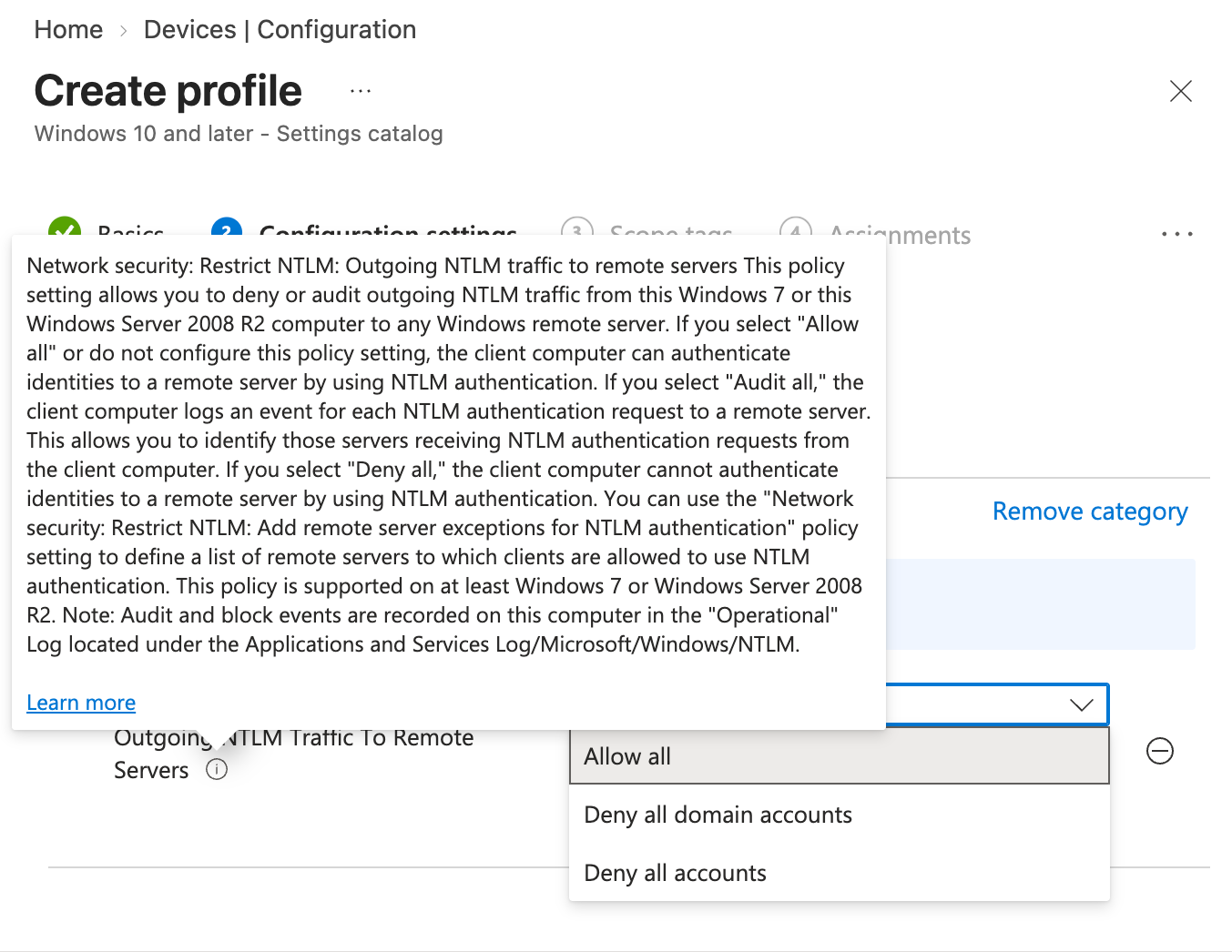
This inconsistency is not limited to the Intune interface.
Microsoft’s current Policy CSP documentation for NetworkSecurity_RestrictNTLM_OutgoingNTLMTrafficToRemoteServers contains the same contradiction. It describes value 1 as Audit all behaviour in the explanatory text (not explicitly but implicitly) while labelling that same value (1) as Deny all domain accounts in the allowed-values table.
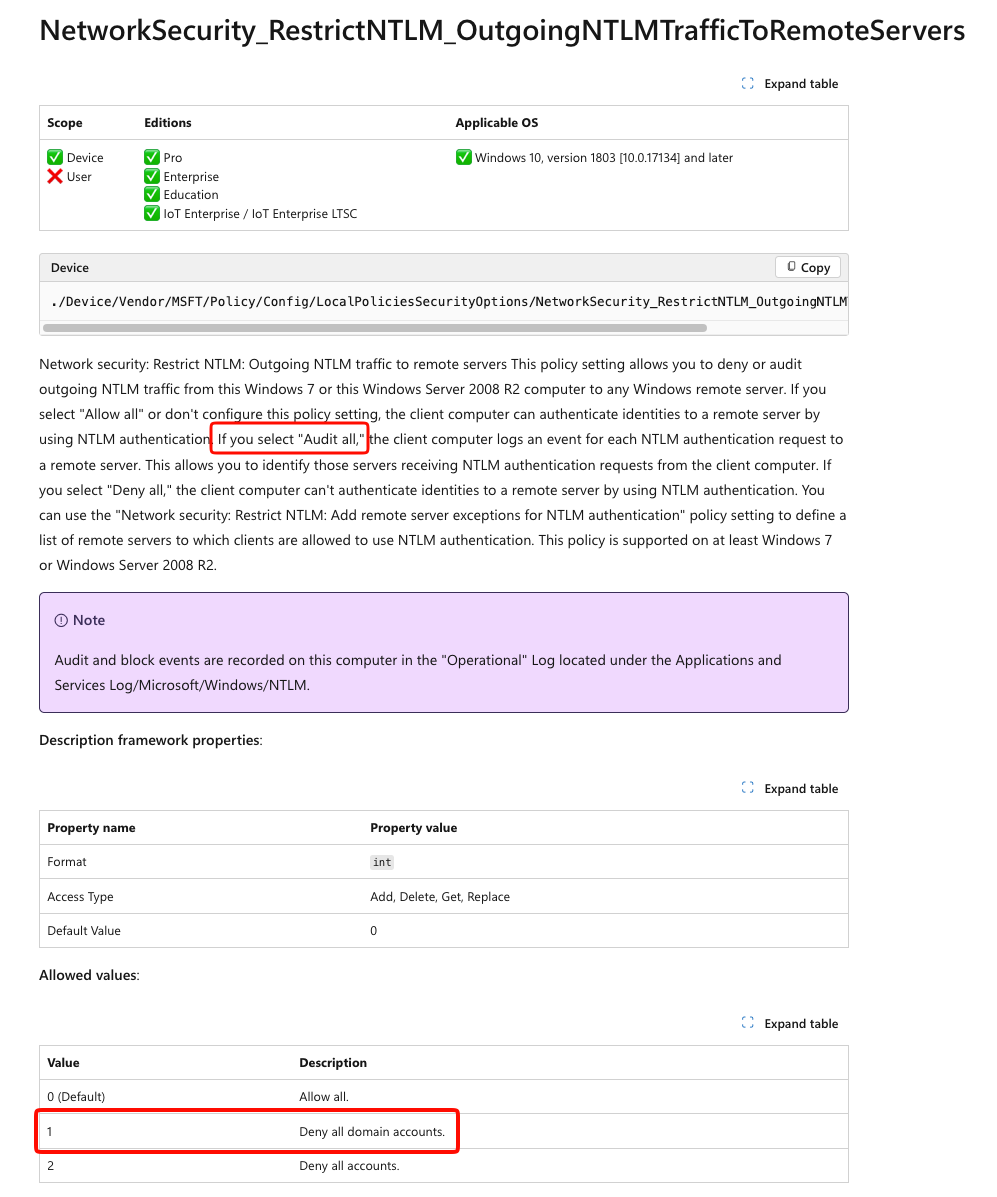
Interestingly, Deny all domain accounts is a valid concept for the separate incoming NTLM traffic policy. For incoming authentication, Microsoft defines that option as rejecting NTLM authentication for domain accounts while continuing to permit local-account authentication. The Policy CSP documentation correctly describes this distinction for the incoming policy.
For the outgoing policy, however, Microsoft’s dedicated security policy documentation contains no equivalent domain-account-only enforcement state.
Verifying What Intune Actually Applied
Rather than relying on the label presented in Intune, I validated the resulting configuration directly on the Entra joined device.
I selected Deny all domain accounts, synchronised the device with Intune, and inspected the underlying Windows device registry for RestrictSendingNTLMTraffic.

The endpoint was not configured with a distinct domain-account-only outgoing restriction. Intune had applied numeric value 1, which behaved as the Audit all state documented for the Windows outgoing NTLM policy.
Intune “Deny all domain accounts” →
RestrictSendingNTLMTraffic = 1→ Audit all
The mapping I observed during testing was:
| Intune Settings Catalog label | RestrictSendingNTLMTraffic | Observed effective policy |
|---|---|---|
| Allow all | 0 | Allow all |
| Deny all domain accounts | 1 | Audit all |
| Deny all accounts | 2 | Deny all |
This distinction matters from a defensive perspective. An administrator could configure Deny all domain accounts, see the policy reported as successfully applied by Intune, and reasonably believe that outgoing NTLM authentication is being denied.
For this reason, organisations should validate the effective endpoint state rather than relying solely on the label presented by Intune.
Just to double check whether it is set to Audit mode or not, I tested the differences on the wire.
With Intune configured as Deny all domain accounts, resulting in RestrictSendingNTLMTraffic = 1, the endpoint continued through the NTLM authentication exchange.
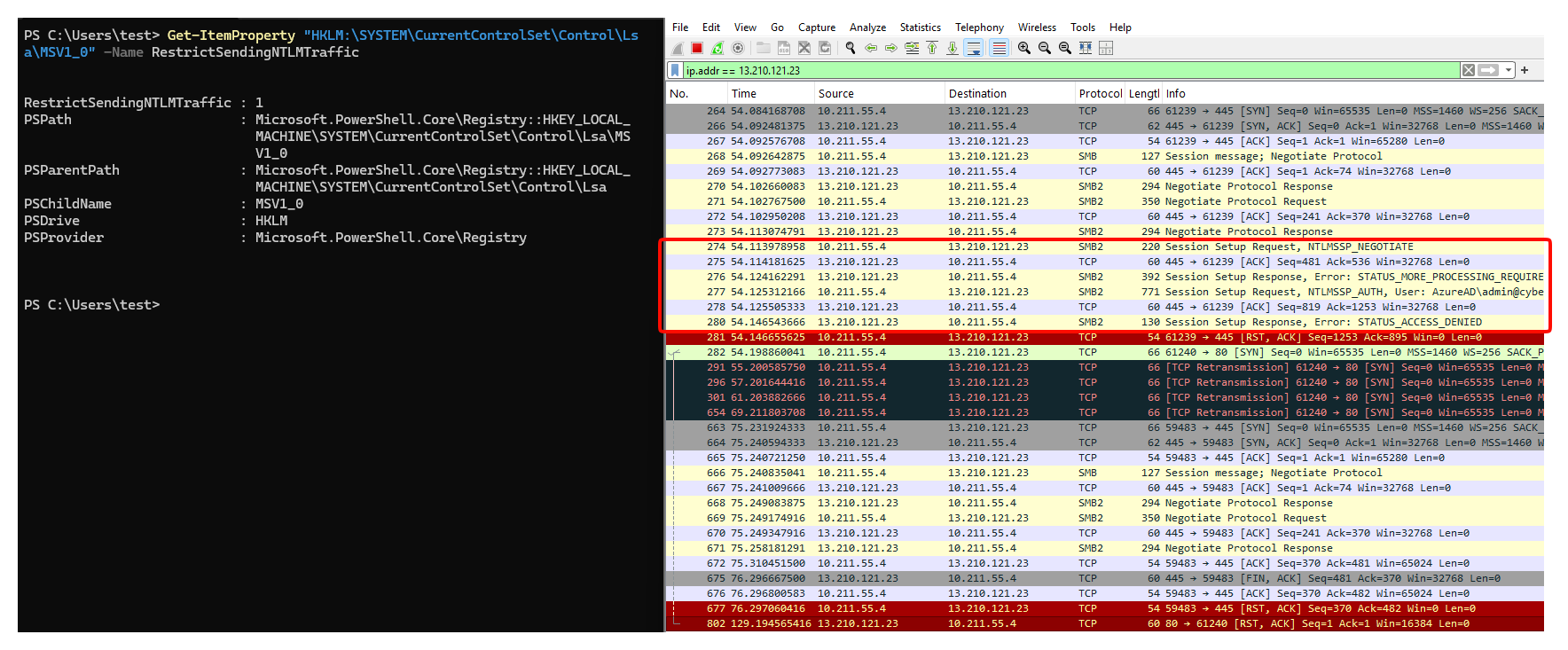
I then changed the Intune setting to Deny all accounts, synchronised the device and confirmed that the endpoint was configured with RestrictSendingNTLMTraffic = 2.
The SMB server remained reachable over TCP/445; however, the endpoint no longer transmitted the NTLM authentication exchange to the remote server.
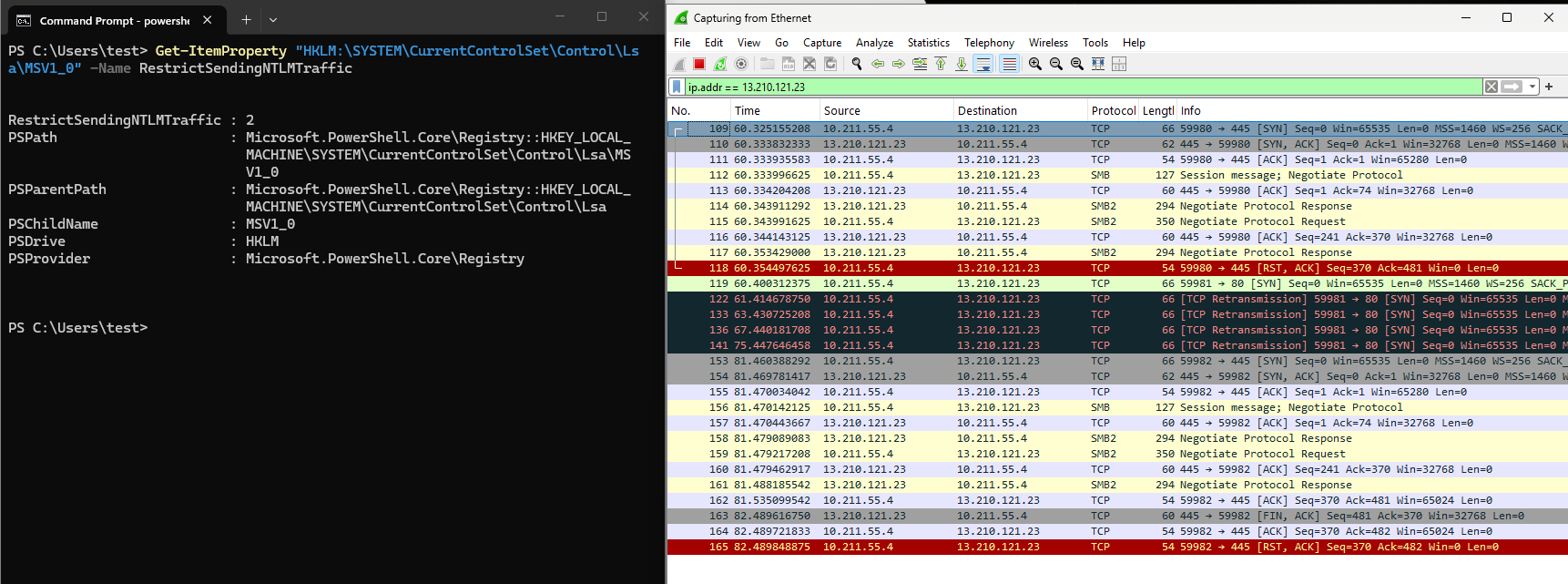
Administrators should confirm the resulting RestrictSendingNTLMTraffic value and, ideally, validate the behaviour through NTLM event logging or controlled network testing before assuming that outbound NTLM has been restricted.
Things I Tried That Didn’t Work
After confirming that I could obtain Net-NTLMv2 authentication from an Entra joined endpoint under the conditions I tested, I started to wonder whether there was any useful relay path.
Relaying authentication into traditional on-premises services is already well researched, so that was not particularly interesting to me. I was much more interested in Microsoft Entra Domain Services.
Entra Domain Services provides managed domain capabilities for environments that still have applications requiring traditional protocols such as Kerberos, LDAP or NTLM, without organisations having to manage conventional domain controllers themselves. That immediately caught my attention.
While reading Microsoft’s documentation, I noticed that Entra Domain Services supports secure LDAP and provides an option to make secure LDAP available over the internet.
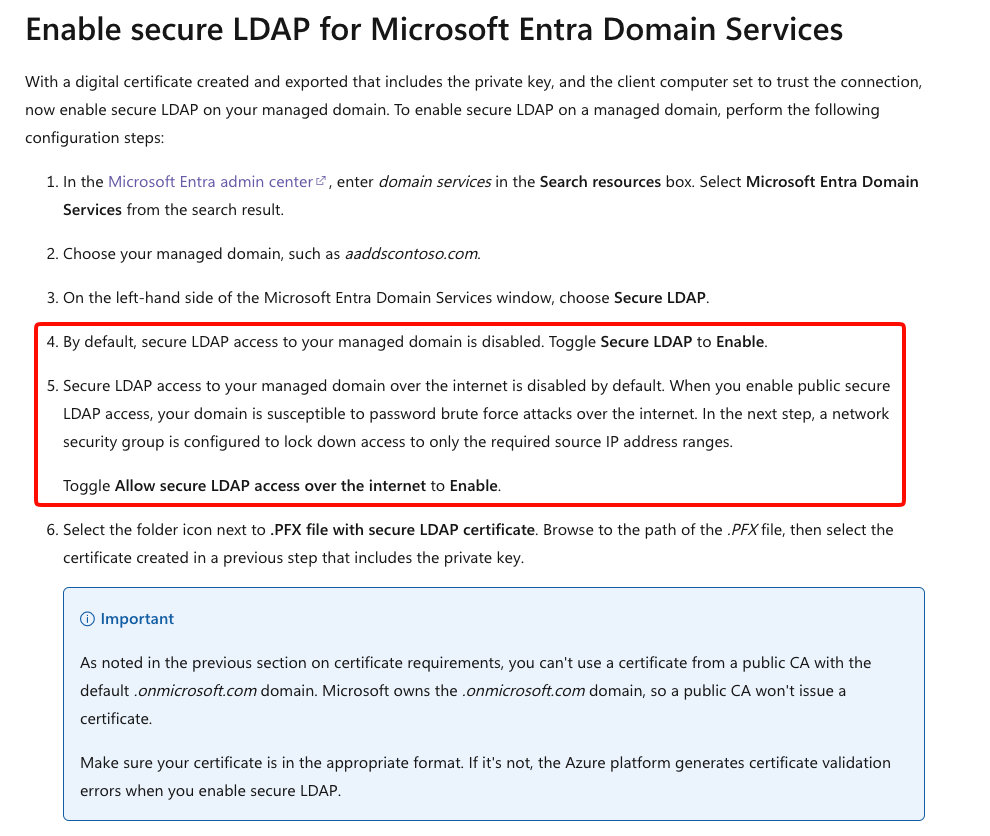
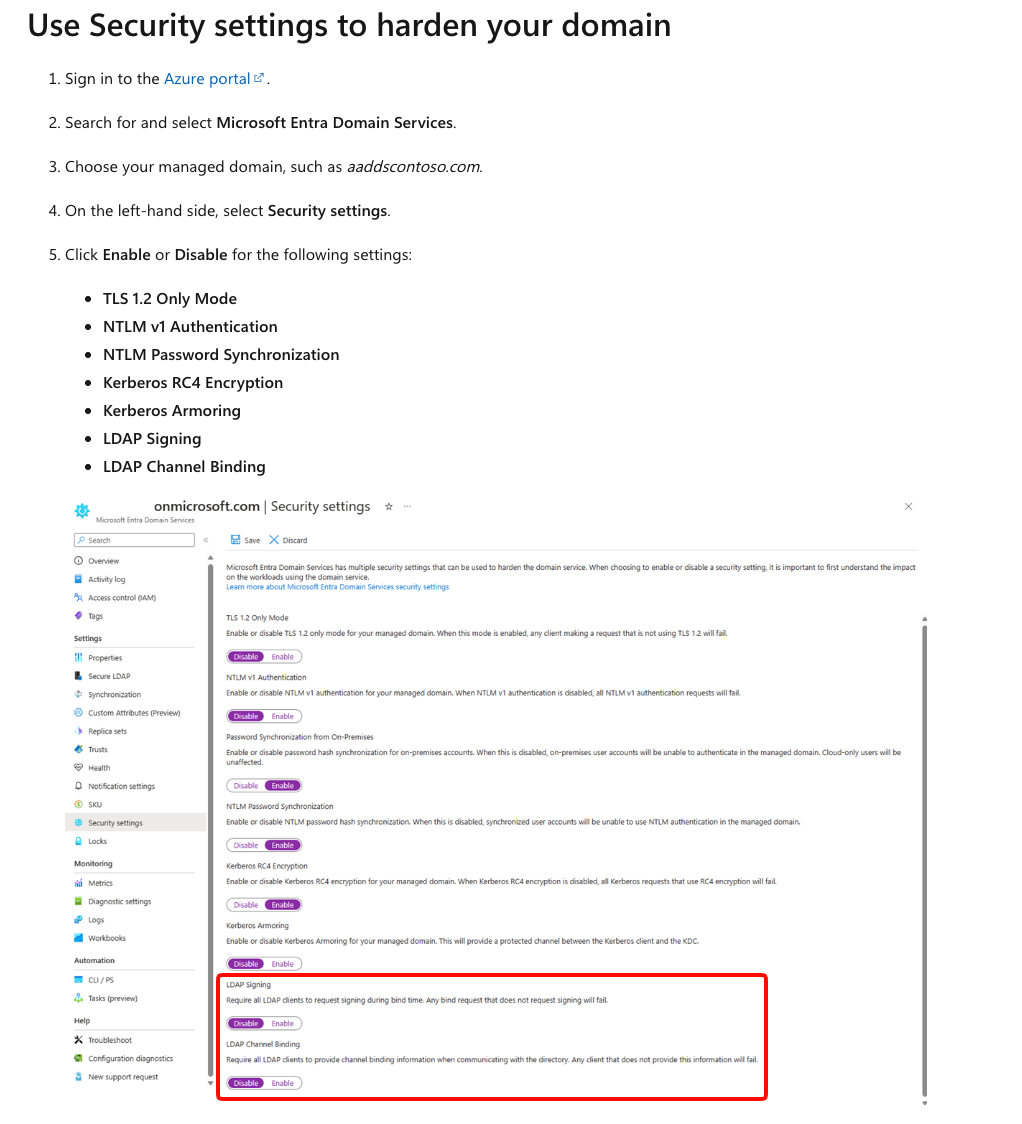
I also started looking into LDAP signing and channel-binding protections to understand whether there was a realistic relay path.
At this point, I thought I might have found an interesting chain:
Entra joined workstation → forced authentication → Net-NTLMv2 → relay → Entra Domain Services
I started investigating whether WebDAV could provide an appropriate authentication path for the relay scenario. For a brief period, everything seemed to line up.
Then it didn’t.
The Downfall
There were several problems with the idea that I had either misunderstood or overlooked while getting excited about the potential attack chain.
1. Enabling LDAPS Does Not Simply Expose the Service to the Entire Internet
Making secure LDAP available over the internet does not automatically mean the service becomes universally reachable. Network Security Group controls still apply and can significantly restrict which sources can reach the service, making the scenario considerably less practical when appropriately configured.
2. LDAP Signing and Channel-Binding Protections
Some of the assumptions I initially made while reading documentation and older material did not reflect the security configuration I encountered during testing, particularly as LDAP signing and LDAP channel binding are now enabled by default.
3. WebDAV Ruined the Practical Attack
This was the point where the attack stopped being interesting to me.
When attempting to use WebDAV across the internet-accessible boundary, Windows presented an authentication prompt rather than the transparent authentication behaviour I wanted. The user would need to provide credentials interactively.
At that point, the entire premise falls apart.
If my attack requires convincing a victim to manually enter their username and password into an authentication dialog, there are already far more direct social-engineering techniques available. I could use adversary-in-the-middle phishing, a browser-in-the-middle approach or even a conventional credential-harvesting page. Those approaches remove the need to capture and crack Net-NTLMv2 in the first place.
A relay could theoretically retain advantages in very specific environments, particularly where Conditional Access policies restrict other authentication paths, but the prerequisites required to reach that point made the scenario increasingly unrealistic.
Even if the first two conditions were somehow met, I would still have the third problem: the victim would need to manually enter their credentials.
At that point, there are simply better attack paths, so I stopped digging.
Final Thought
It is worth mentioning that the Windows Search URI handler behaviour has previously been reported to Microsoft. As documented from When “Moderate” Means “Sometimes”, Microsoft classified the issue as Moderate severity and indicated that it did not meet the threshold for immediate servicing. Hopefully, showing how the behaviour can be incorporated into a practical phishing flow helps bring some additional attention to it and, eventually, gets the underlying behaviour addressed.
Until then, defenders can still break the attack chain by restricting unnecessary outbound SMB, controlling outgoing NTLM and monitoring for unexpected SMB or NTLM authentication to internet-hosted systems.
As for the Entra Domain Services relay path, I couldn’t find a practical way to make it useful given the controls and authentication behaviour I encountered. If someone finds a realistic path that I missed, I’d be very interested to see the research.
References
- Microsoft — Network security: Restrict NTLM: Outgoing NTLM traffic to remote servers
- Microsoft — Policy CSP: LocalPoliciesSecurityOptions
- CDW — Unpacking authentication between Entra ID joined workstations
- Huntress — Unpatched NTLM leak via the Windows Search URI handler